Tests
PNG vs JPEG vs WebP: what one controlled test shows
Short version
Do not pick an image format by reputation. On one controlled 1600×1200 photo, PNG was 4,231 KB, JPEG q90 was 659 KB and WebP q90 was 739 KB. Quality 90 is not equivalent across formats, so compare actual output at visually similar quality.
Choosing between PNG, JPEG and WebP often turns into a ritual: pick the newest format and assume it wins. That is not how image encoding works.
We ran a controlled comparison using the same synthetic photo-like image at 1600×1200. The files were encoded locally; no user images were used and nothing was uploaded.
The results
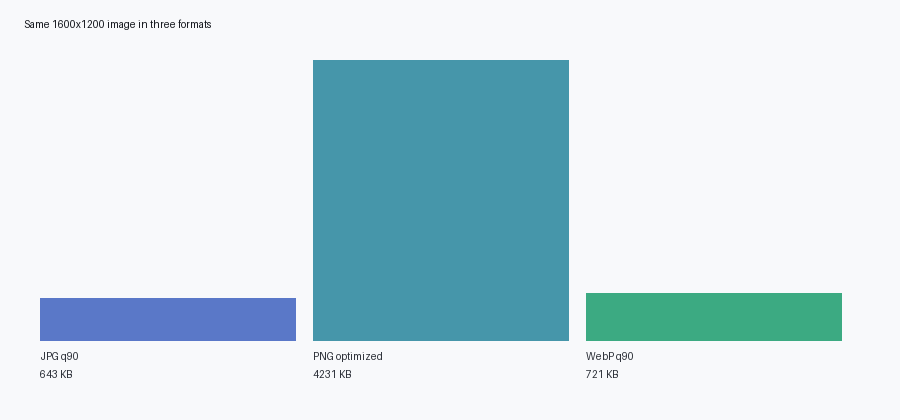
| Format and setting | File size |
|---|---|
| Optimized PNG | 4,231 KB |
| JPEG, quality 90 | 659 KB |
| WebP, quality 90 | 739 KB |
JPEG was the smallest in this test. WebP was close but larger. PNG was over six times the size of either lossy format.
That might surprise anyone who has read that WebP always beats JPEG. A quality value is not a universal unit: 90 in one encoder does not mean the same visual quality as 90 in another. Encoder versions and image content matter too.
Why the formats behave differently
PNG is lossless. It preserves pixel values exactly, which is ideal for logos, screenshots, interface elements and anything with sharp edges or transparency. Photographs contain complex colour variation, so PNG files can become enormous.
JPEG is lossy. It discards some information to reduce size. For photographs, moderate loss often produces a big saving with little visible difference at normal viewing size. Its weaknesses are compression artifacts around text and edges, and no transparency.
WebP supports both lossy and lossless encoding plus transparency. It is useful on the web, but a WebP export is not automatically smaller than a JPEG export of the same image. Compare the actual files.
How to choose without guessing
- Photographs: compare JPEG and WebP at visually similar quality, not just the same number.
- Logos, screenshots, graphics with text or transparency: start with PNG.
- Web delivery where modern browser support matters: WebP is worth testing.
- Archives where exact pixels matter: keep the lossless original regardless of delivery format.
The fastest habit is to export two or three versions, look at text, edges and gradients, then choose the smallest file that still looks right. The image converter and image compressor run those comparisons in the browser.
A note on method
This is one image and one encoder path. It is a demonstration of why format reputation is unreliable, not a universal benchmark. Other tests with different images can produce different winners — and that is exactly the point. If a comparison article does not state its source image, dimensions and quality settings, it is not giving you a result you can reproduce.
For how image dimensions affect PDF size rather than image file size, see our four resolution tests.
Frequently asked questions
Is WebP always smaller than JPEG?
No. In our test JPEG q90 was smaller. Results depend on the source image, encoder implementation and quality setting.
Why did PNG optimisation not help?
The synthetic source was already efficiently encoded as PNG. Optimisation removed no measurable bytes in this case.
Which format should I use for screenshots?
PNG is usually safer for sharp edges, text and transparency. Photographs tend to favour JPEG or WebP.